
← Case Studies

Case Study — Enterprise SaaS

Quork Board:
Timesheet, Billing & Invoice

Digitizing legacy Excel-based operations into an automated financial workflow platform for Unqork enterprise operations.

Role
Lead Product & UX Designer
Platform
Enterprise SaaS (Unqork)
Tooling
Figma · User Research · User Flow Architecture
SUS survey score
1.3→3.8
System usability
Reconciliation time
−46%
Billing, on average
Accuracy
+31%
Billing and invoicing
Invoice pushback
−14%
Caused by resourcing errors
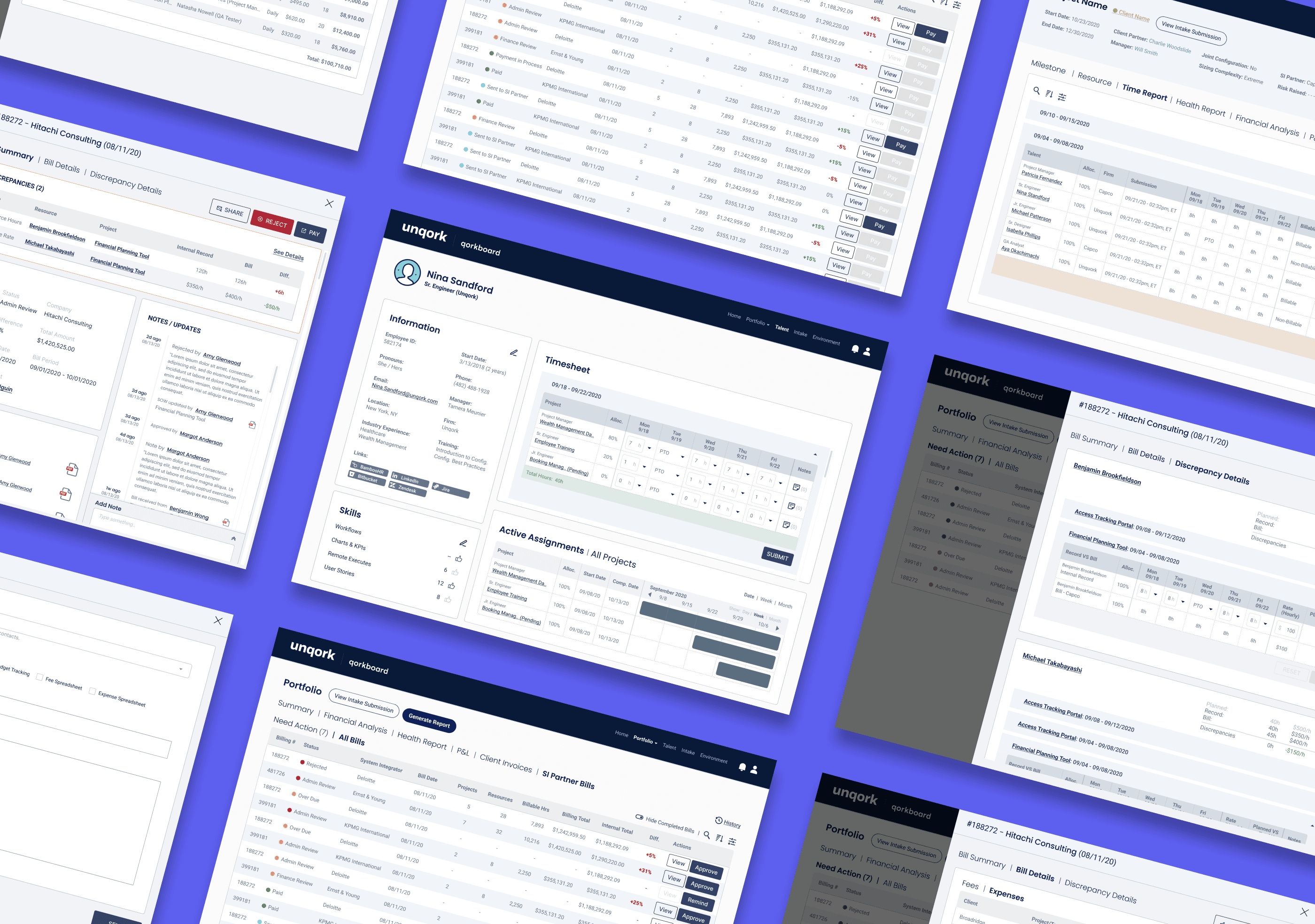
Quork Board timesheet, billing and invoice screens

01

Executive Summary & Problem Statement

Background

Unqork ran its internal operations on Excel spreadsheets and manual hand-offs. Every billing cycle meant time-consuming bottlenecks, lost records and reconciliation errors that reached clients and SI Partners.

Solution

An Automated Financial Operations Suite that connects Timesheet, Billing and Invoice workflows — so one set of records drives what talent submits, what partners are paid and what clients are invoiced.
Timesheet
Hours pre-filled from resource planning, submitted by talent and adjusted by Operations.
Billing
SI Partner bills checked against internal records, approved by Operations and paid by Finance.
Invoice
Client invoices generated from the same records, reviewed and sent from one queue.

A 20-week engagement covering Financial Analysis, Resourcing, Timesheet, Billing and Invoice, with two designers, a project manager and two SMEs from the Finance and Operations teams.

02

Discovery & Requirements

I interviewed four engagement managers and the Operations team, alongside finance SMEs, to map the current process, its pain points and what each team needed — the findings that set the product scope.

Two teams, two kinds of manual work

User group

Operations Team

Pain point

Manual discrepancy checks to prevent invoice and resourcing errors

Checking discrepancies across multiple Excel files caused frequent errors and pushback from clients and SI Partners. The team wanted to cut invoice pushback caused by manual resourcing input errors.

Scope

  • Automate bill discrepancies
  • Invoice status tracking

User group

Finance Department

Pain point

Manual billing tracking

Finance sometimes lost track of where each bill stood and which were ready to pay, while others still needed OP adjustments and constant check-ins. SI Partners complained about late payments and couldn't tell where their bills were.

Scope

  • Track billing status
  • Surface items that need action

Requirement cheat sheet

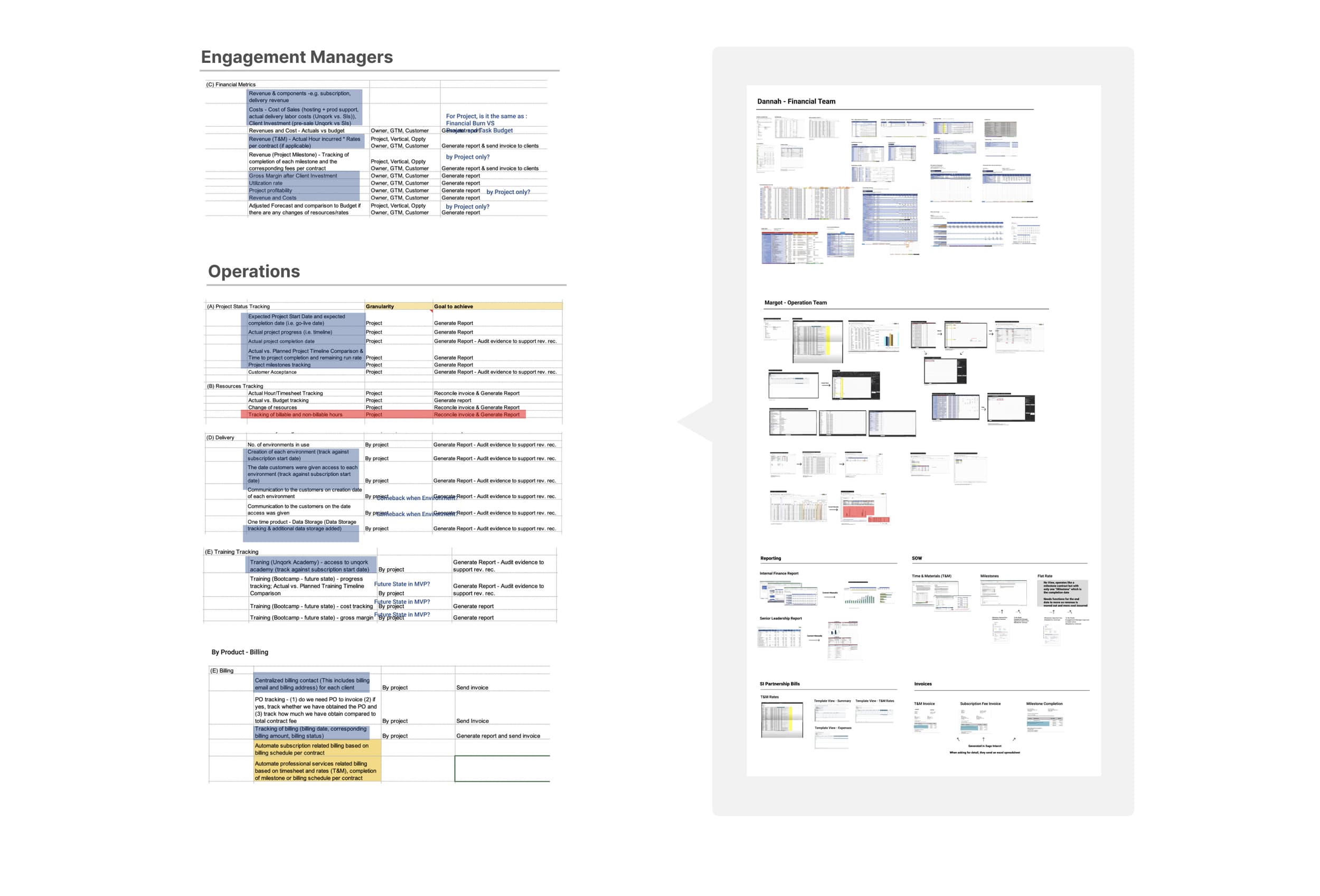
With the Operations and Finance teams, I built a shared requirement cheat sheet — starting from interview findings and flow walkthroughs, and mapping each need directly to system scope. It became the baseline every later decision was checked against.

Requirement cheat sheet mapping engagement manager and operations needs to granularity and goals, beside the teams' existing spreadsheets

03

Architecture & Workflows

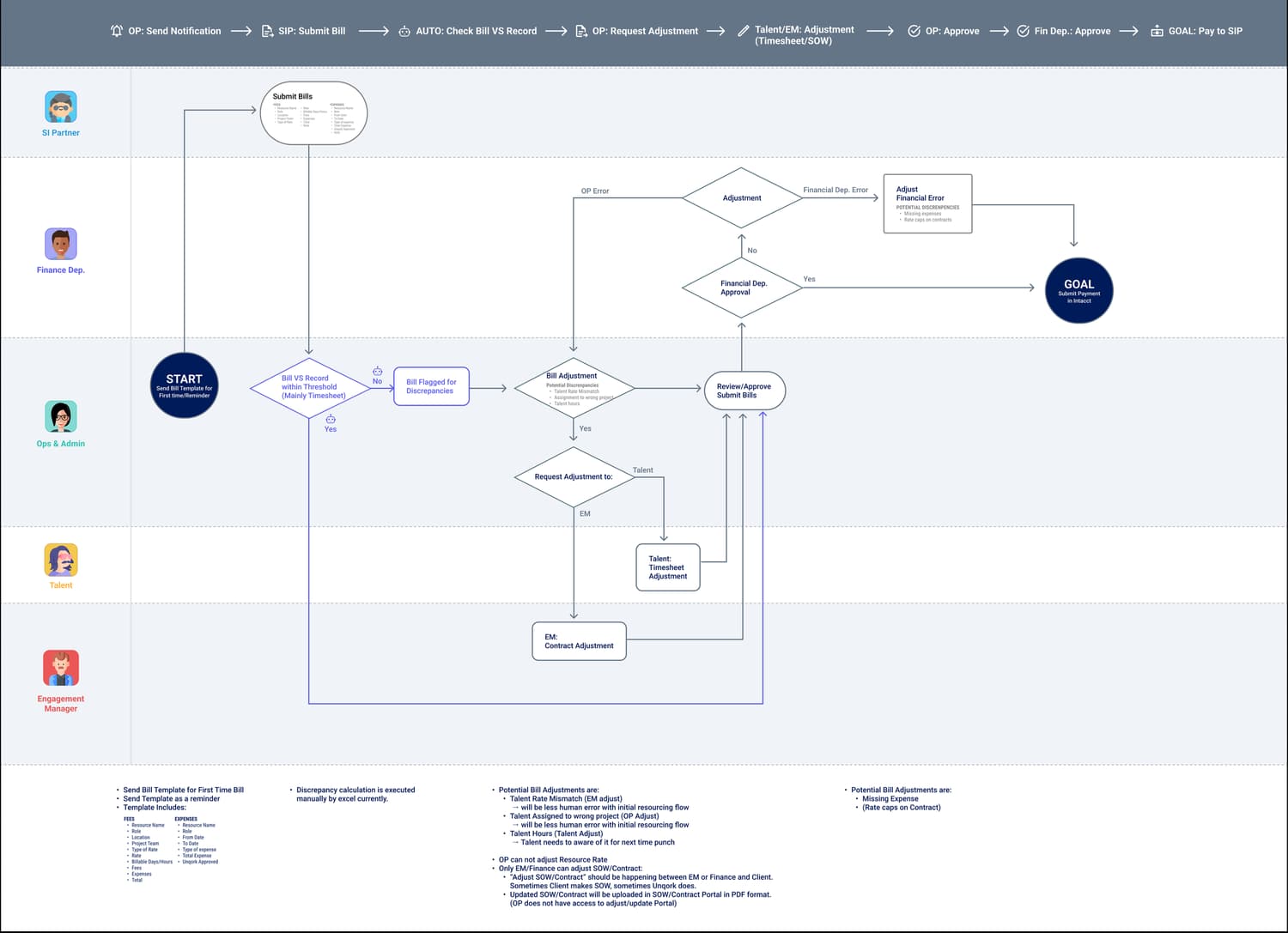
I mapped the current flows from the interviews to find where automation could replace manual checks, then digitized them end to end.

Billing flow: SI Partner bill to payment across SI Partner, Finance, Ops, Talent and Engagement Manager lanes

SI Partner bill to payment. Bills are checked against time records automatically; only discrepancies go to the right owner — Talent, Engagement Manager or Ops.

Key automation checkpoints

  • Bill-vs-record checkEvery SI Partner bill is compared with time records; only lines outside the threshold are flagged.
  • Default timesheet submissionPlanned hours are submitted automatically if talent misses the end of the billing cycle.
  • Invoices from internal recordsClient invoices are generated from the same records, ready for review in “Need Action.”

Proposed sitemap

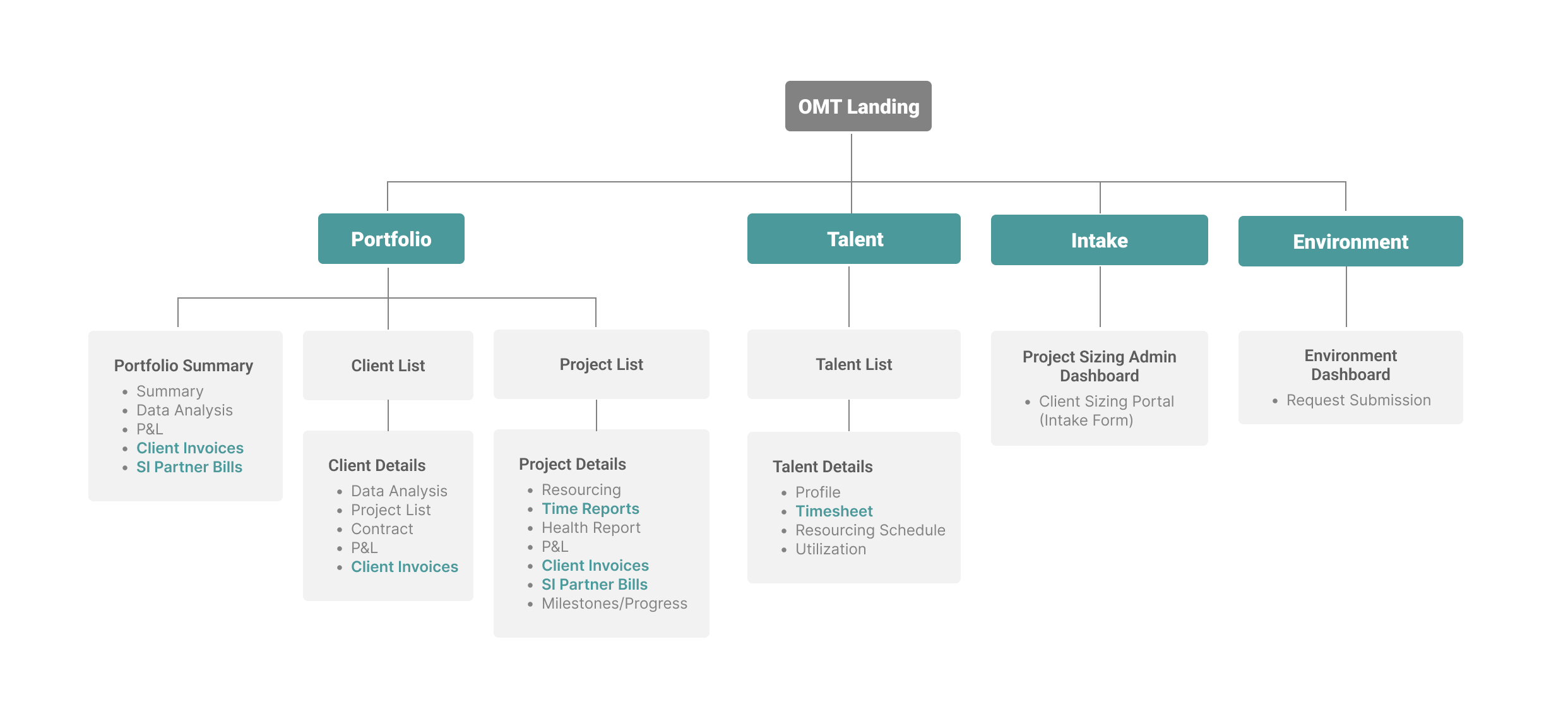
A high-level sitemap built from the interviews, scope and requirements. Billing and invoicing live where people already work — in the portfolio, client, project and talent views — rather than in a separate tool.

Sitemap: OMT landing with Portfolio, Talent, Intake and Environment; client invoices, SI Partner bills, time reports and timesheets highlighted

04

Final Product

Three connected flows, each with a clear owner at every step — from the hours talent submits to the bill Finance pays and the invoice a client receives.

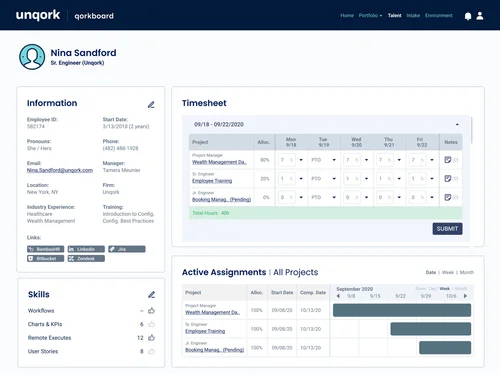
Talent timesheet pre-filled with planned hours

Default values are pre-filled from Resource Planning.

05

Interactive Financial Dashboard

The core interactions, rebuilt in code. Move bills through their statuses, send invoices, and resolve flagged lines to see how each status exposes exactly one next step and who owns it.

Need action
3
With Finance
$19,800
Paid this cycle
$22,300

SI Partner bills

Billing cycle Sep 1 – 15 · each status shows its one next step

BillSI Partner · ProjectAmountStatusOwnerNext step
B-1041Northwind PartnersClaims Portal$48,200Awaiting billOP / Admin
B-1042Bluepeak ConsultingOnboarding Hub$31,650DiscrepancyOP / Admin
B-1043Arcline SystemsPolicy Admin$27,400Ready to approveOP / Admin
B-1044Meridian DigitalPayments API$19,800With FinanceFinance

Recreated in code from the shipped design. Partners, clients, people and amounts are illustrative.

06

Results & Next Steps

1.3 → 3.8

SUS survey score

−46%

Billing reconciliation time, on average

+31%

Accuracy

−14%

Client invoice pushback caused by resourcing

Next steps

Itemized invoices per client
Dropped from the MVP; to be revisited based on user feedback.
Digitized SOWs and contracts
SOWs vary by SI Partner and live only as PDFs. Making them searchable would speed up billing and enable planned-vs-actual fee checks.
SI Partner Portal
Automatic reminders with the bill template attached.
Auto-sent invoices
Without digitized SOWs, users may not trust fully automated billing, so I designed the ideal post-MVP flow for when they are.