01
Executive Summary
Context
The original library was delivered by an agency and built component by component. It shipped the first launch, but every new theme, language and page template added more weight to a system with no shared foundation.
Outcome
A full refactor toward role-based semantic tokens, accessibility fixed at the component level, and a library aligned with AEM and engineering — using Claude for a token audit and Figma MCP for hand-off to code.
Streamline components
32 → 23
components · −28%
I reviewed every component through two lenses — the Authoring Experience (AX) in AEM, and the cost of maintaining it across design and development — then merged redundant structures and consolidated their variants.
- Redundant components
- Removed duplicate components and variations, and consolidated variations that were never presented.
- UI matched to function
- Resolved components that looked identical but behaved differently, and ones that did the same job with different designs.
- Library structure
- Organized into Core, Components and Local Elements for easier maintenance.
Example: Content Grid
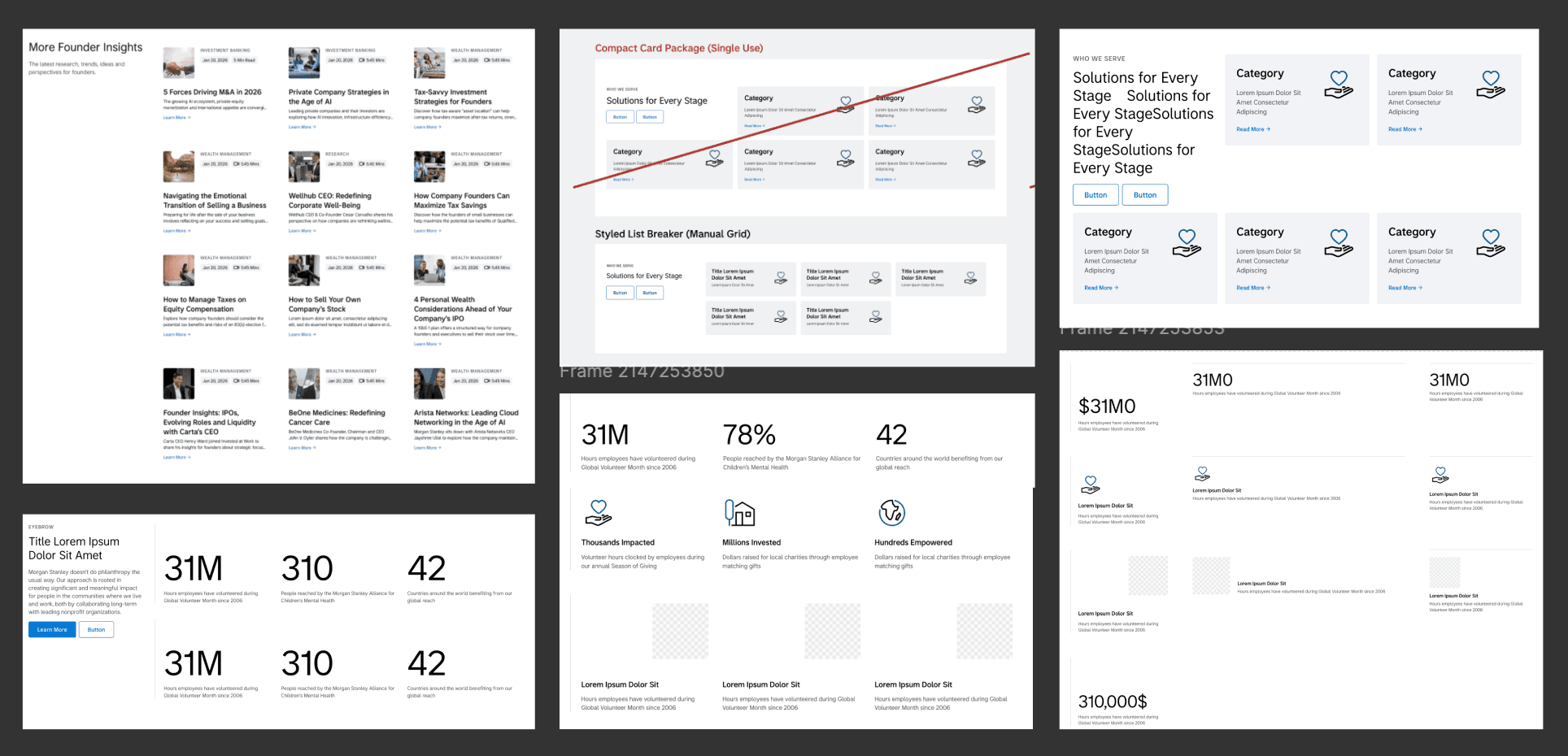
Four legacy components
- Compact Card PackageSingle use
- Styled List BreakerManual grid
- Card Grid
- Value Prop PackageSingle use
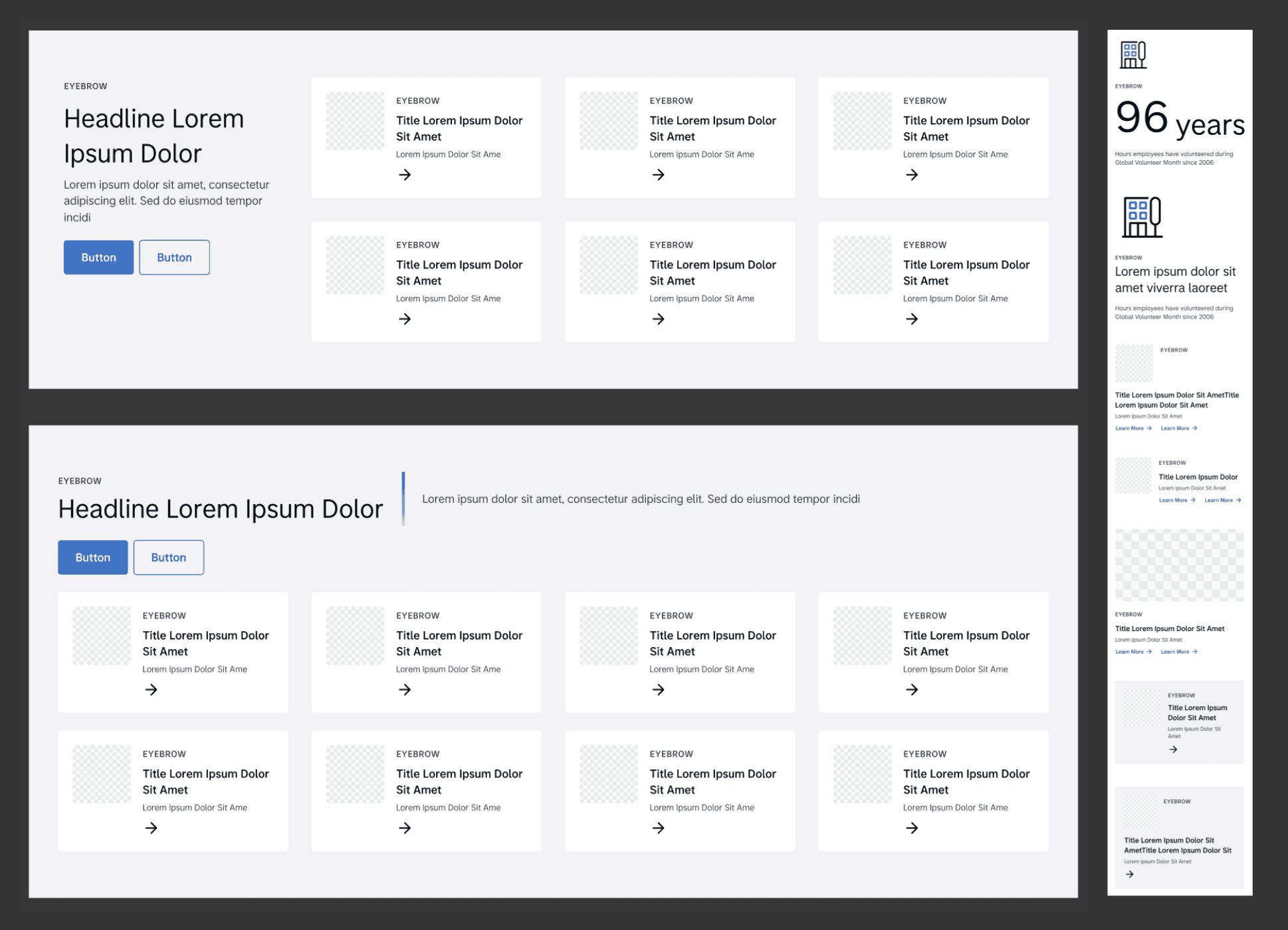
One Content Grid
- Aligned to the basic page grid
- Vertical or horizontal header, 2–4 columns
- Grid items: Stat List, Stat List Text, Card Block, List Item
- Appendix stat text added
02
Problem Statement & AI Audit
Every component carried its own isolated copy of color styles, each behind a long, component-specific path name — such as colors/text/button/primary/default/base/disabled.
- Massive technical debt
- The same value existed under dozens of names. A single brand change touched every component, and no one could say which value was canonical.
- Broken theme scalability
- Colors were bound to elements, not roles, and the Theme collection also held fonts, spacing, sizes and borders — so four theme modes existed for two real appearances.
- No governance
- Without naming rules or ownership, styles were added ad hoc and drifted further from the code.
AI-assisted token audit
Before changing anything, I audited the existing variables and tokens with Claude — flagging invalid styles, duplicate values, overlong paths and structural gaps in the token hierarchy. What would have taken days of manual inspection became a prioritized remediation plan the team could review and agree on.
- ❯ audit figma-library --scope variables,tokens
- Variables
- !Theme collection holds non-color valuesfont family · weight · size · spacing · size · border
- !Colors bound to components, not roles336 theme colors
- !4 theme modes for 2 real appearancesLight Prim. · Light Sec. · Dark Prim. · Dark Sec.
- ✕Path too long (depth 7)colors/text/button/primary/default/base/disabled
- !Unused tokens and alpha color issues detected
- Accessibility
- ✕WCAG AA contrastCTA text · inputs · focus ring
- ✕Target size below 24×2416×16 icon buttons
- Components
- !Same UI, different functionality
- !Different UI, same functionality
- !Variations that were never presented
- ·Card system: 235 variants across Basic / Immersive / Grid / Compact
- Result
- ✓Theme 336 → 59 · 4 modes → 2 (Light / Dark)
- ✓Published tokens 578 → 377, incl. multi-language
- ✓Path renamedforeground/disabled
- ✓Components 32 → 23 · Card variants 235 → 7
Summary of the AI-assisted token audit with Claude. Totals are published tokens, excluding .Primitives.
From findings to decisions
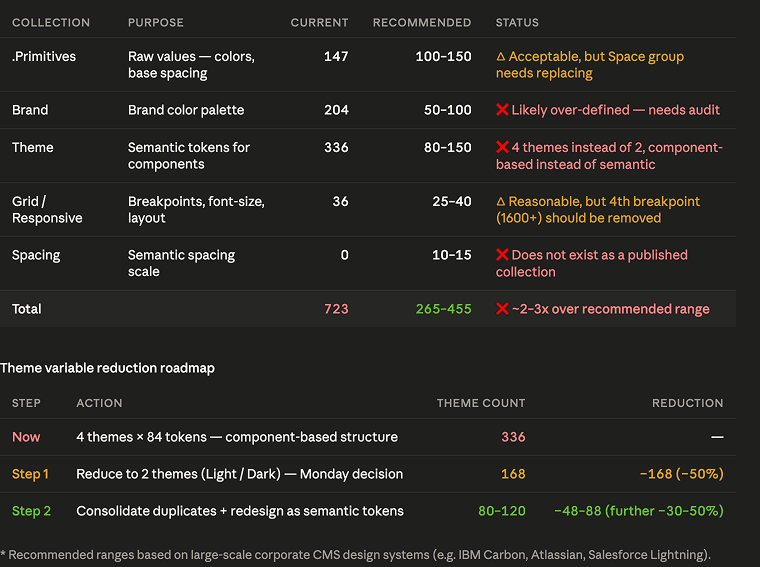
Collections
~2–3× over the recommended range
- Each collection measured against ranges from large-scale CMS design systems
- Theme flagged: 4 themes instead of 2, component-based instead of semantic
- The 4th breakpoint (1600+) flagged for removal
- Roadmap: cut to 2 themes first (−50%), then consolidate into semantic tokens — the final Theme landed at 59
03
Token & Typography Architecture
I moved the system from element-bound tokens to role-based semantic tokens — named for what a color does, not where it appears. Theme is now only for color switching, and Light and Dark resolve from the same set.
336 → 59
theme colors · −82% · 4 modes → 2
578 → 377
published tokens · −35% · incl. multi-language
- Shorter paths
- colors/text/button/primary/default/base/disabled became foreground/disabled.
- Semantic, not per component
- Tokens describe a role — background, foreground, action — and every component shares them.
- Collections reordered
- Theme comes first, so designers see and choose semantic colors before anything else.
Color system principles
- Two modes
- Theme modes limited to Light and Dark, with primary, secondary and tertiary backgrounds in each.
- Reusable, not specific
- A variable is created only when multiple components need it.
- Few pairings
- Foreground and background combinations kept low — avoiding authorable colors on authorable backgrounds.
- No over-tokenization
- Names stay short, self-explanatory and searchable, grouped into bg, foreground, border, gradient, shadow and utility.
Sub-collections for multi-language
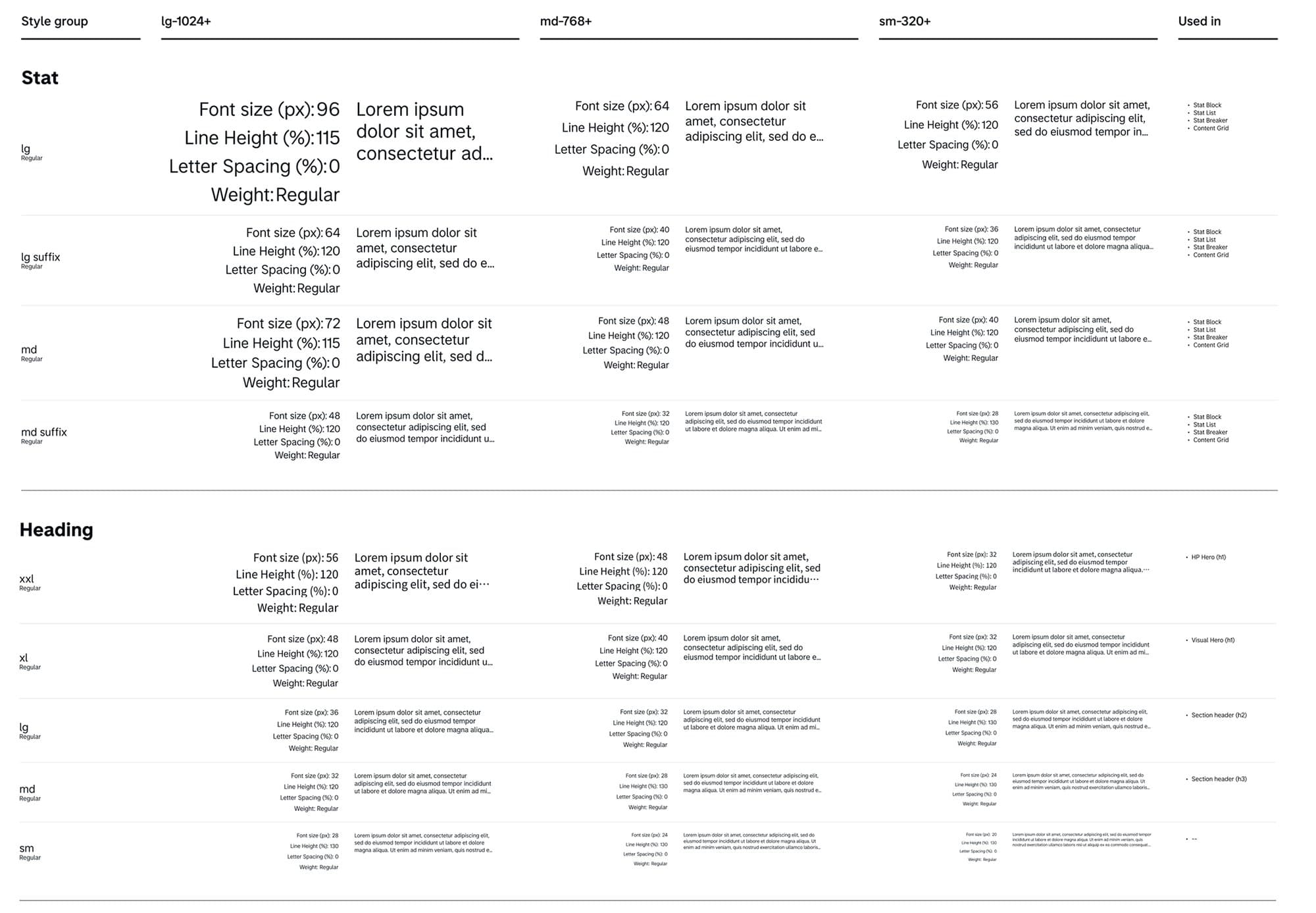
English and Japanese need different sizes, line heights and spacing to read well. Typography lives in Responsive EN with a Responsive JA sub-collection, each with its own dynamic scale across breakpoints. Components switch language without separate variants.
Theme          59  color switching
Responsive EN  88  language × responsive
└ Responsive JA
Scale          35  absolute values
Brand         195
- Responsive scale for widths and component paddings
- Retired Display, Lead and Quote sizes; added Label and Absolute
- Each style documents where it is used, e.g. Stat lg in Stat Block and Content Grid
04
Accessibility & Component Remediation
Accessibility was built into the foundation rather than checked at the end. Fixes live in tokens and base components, so every page inherits WCAG AA across core interactive components.
- CTA contrast
- Fills and text CTAs raised to AA, including on gray backgrounds.
- Inputs
- Borders and text brought into AA contrast range.
- Focus rings
- AA-safe color, aligned to component bounds, on every interactive element.
- Touch targets
- Expanded from 16×16 to 28×28 and above.
- Interactive states
- Missing hover, focus, active and disabled states supplied.
Button · Color · Tag
| primary | secondary | tertiary | |
|---|---|---|---|
| default | Button | Button | Button |
| hover | Button | Button | Button |
| focus | Button | Button | Button |
| active | Button | Button | Button |
| disabled | Button | Button | Button |
Remediation
- AA-safe focus ring, aligned to the component bounds
- Tertiary hover moved from border to background
- Distinct hover color in dark mode
- Text CTA color meets AA on gray backgrounds
- Hug content with a minimum height; xl size added for nav and large CTAs
- New label token; invisible tertiary paddings removed, text left-aligned
Recreated in code from the audit. Colors are illustrative; contrast ratios are calculated live.
Card system: Card Block & List Item
235 → 7
card variants → master components
Basic, Immersive, Grid and Compact cards were rebuilt as two components. A Card Block (Feature, Visual, Compact) is clickable as a whole. A List Item (Horizontal, Vertical, Wide, Center) holds multiple links. Separating them removes link-in-link situations and streamlines variants.
- Use-case variant names (Event, Person, Episode…) removed
- Child variations handled at the child component level
- Compact image ratio changed from 3:2 to 16:9
- Eyebrow always aligned to the top
05
AEM & Engineering Compatibility
AEM authors constantly change text length, imagery and language. The Figma components had to flex the same way the code does.
- Elastic components
- Removed rigid line objects and fixed heights; text overflow and truncation are specified per component.
- Authoring behavior
- Re-specified component behavior around the authoring experience.
- Grid alignment
- Components adapt to the grid system and its sizing.
- Image aspect ratios
- Dynamic Media allows one profile per folder, so renditions should stay minimal: 22 → 7 ratios.
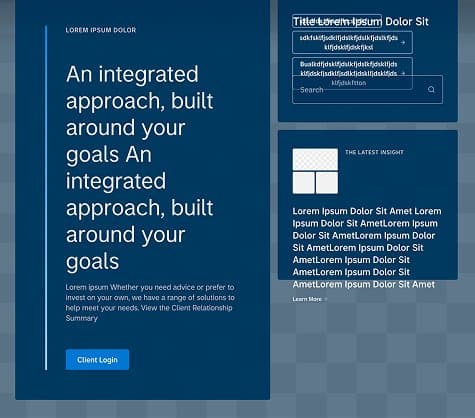
BeforeFixed heights and minimum heights in the right slots — long content overflowed and broke the layout.
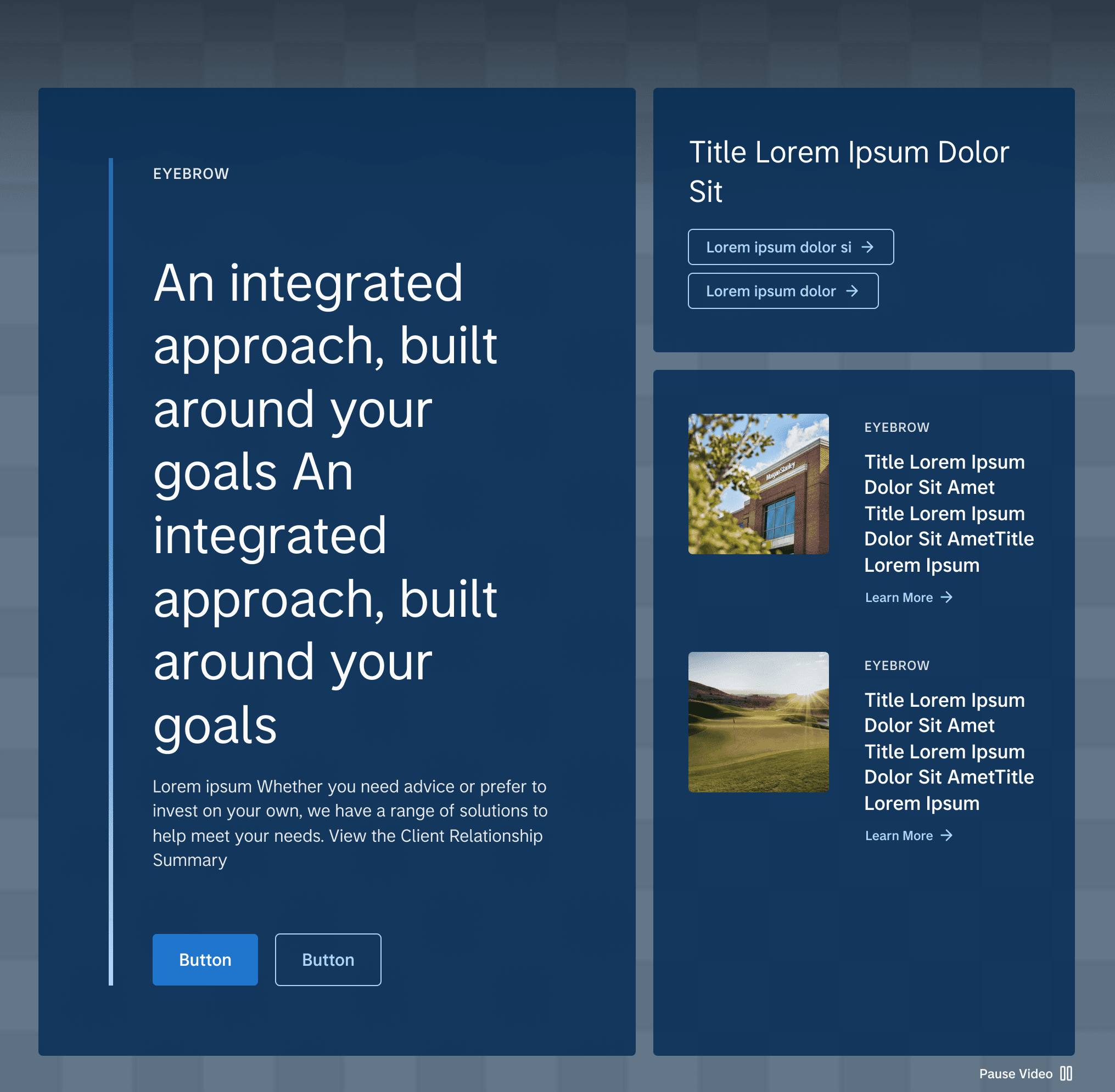
AfterHeights flex with content and always stack to the top. Background media is full-bleed; on desktop the image fills the space beside the left slot, on tablet and mobile it locks to 16:9.
Guides for authors and designers
I created AEM-compatible component templates and design guidelines, along with accessibility guidelines for both designers and content authors — so anyone can build accessible pages without needing to know the system's internals.
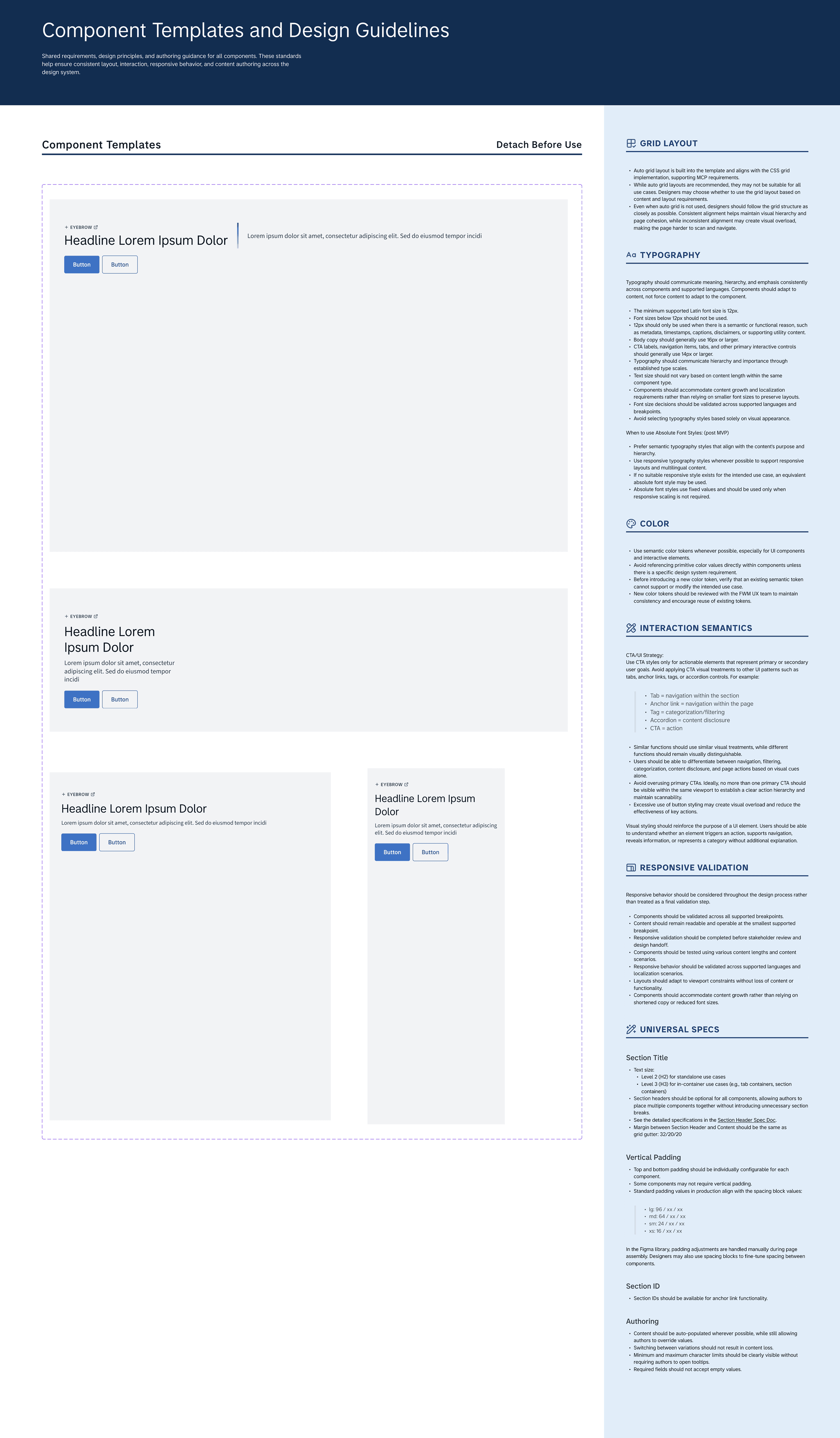
Templates
Component Templates and Design Guidelines
- Templates to detach before use, with auto grid layout aligned to the CSS grid implementation for MCP
- Typography: 12px minimum, 16px+ for body copy, 14px+ for CTAs and navigation
- Semantic color tokens only; new tokens are reviewed before they are added
- Interaction semantics: CTA = action, Tab = section navigation, Tag = categorization
- Responsive validation across breakpoints and languages before review and hand-off
Figma MCP: one structure for design and code
I proposed Figma MCP to the development team as a shared bridge between design and code. Instead of treating the design system as data closed off inside Figma, I worked with engineers to make the token and component structure MCP-friendly — semantic tokens that map 1:1 to CSS classes, and auto layout aligned with the CSS grid — so what designers build is what MCP hands to code.
06
Trade-offs & Strategic Alignment
Constraint
MCP can't reliably read nested components. Flattening them would make the integration cleaner.
Cost
But flattening causes a Figma variant explosion — a library that is harder to use and harder to maintain.
Decision
Preserve nested structures in Figma, and support engineering with clear hand-off documentation.
Aligned with the engineering team, we kept nesting where it reflects how components are built, and documented the edge cases and layout variations MCP can't interpret on its own.
Hand-off example: Content Grid
The Content Grid replaced four legacy components. Its hand-off doc covers every background and layout, maps each element to its AEM authoring field, and charts which grid items work at which column count — the edge cases MCP can't infer.
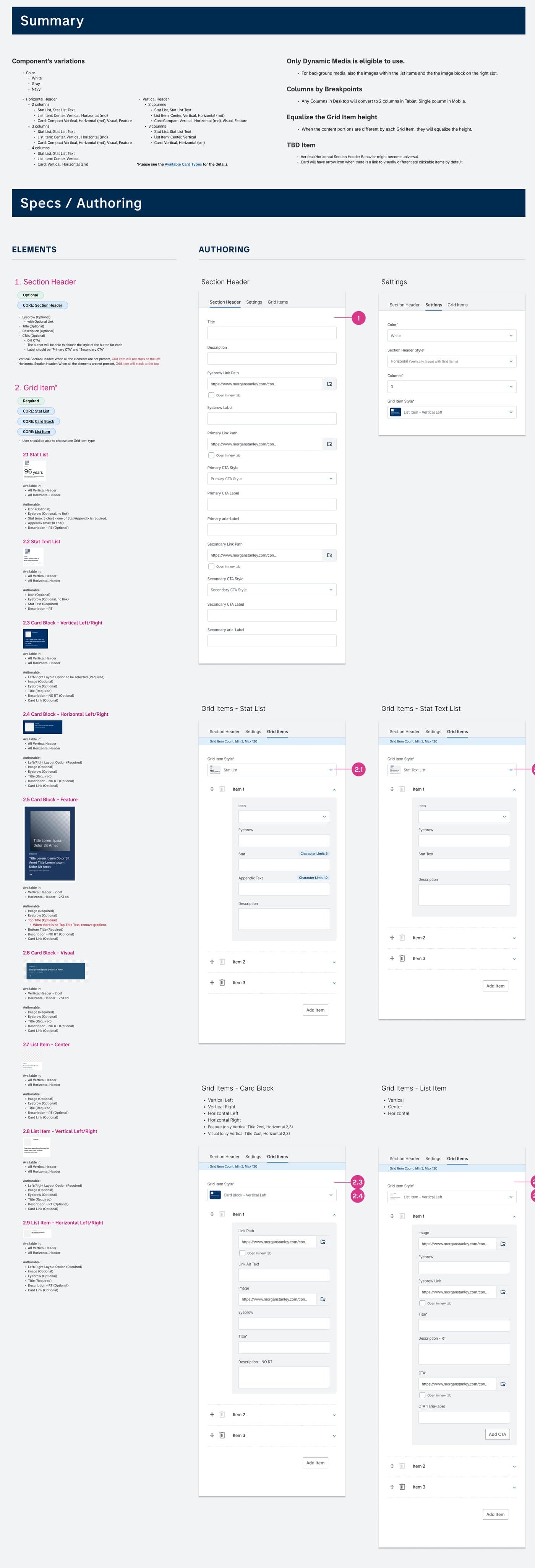
- Each element numbered and matched to its AEM dialog field
- Section header, settings and grid item options
- Grid item types: Stat List, Stat List Text, Card Block and List Item